rel-mimic MIMIC-IV clinical database
Database Description: The Medical Information Mart for Intensive Care IV (MIMIC-IV) is a large, deidentified electronic health record (EHR) dataset comprising clinical data for patients admitted to the emergency department and intensive care units at the Beth Israel Deaconess Medical Center in Boston, Massachusetts. It includes a rich collection of information such as patient demographics, vital signs, laboratory test results, diagnoses, procedures, medication administrations, provider orders, and other clinical events collected during routine hospital care. The database spans many years of care and is designed to support a wide range of clinical research, epidemiology, and machine learning applications that require comprehensive, real-world medical data while protecting patient privacy.
Using this dataset requires credentialed access from PhysioNet. Please follow the steps at the bottom of the MIMIC-IV webpage.
Database Statistics:
| Domain | Medical |
| Num of Tables | 6 |
| Num of Rows | 2,424,751 |
| Num of Columns | 54 |
| Starting Time | 2110-01-14 |
| Validation timestamp | 2168-09-06 |
| Testing timestamp | 2180-10-26 |
| Time window | 1 stay |
Database schema:
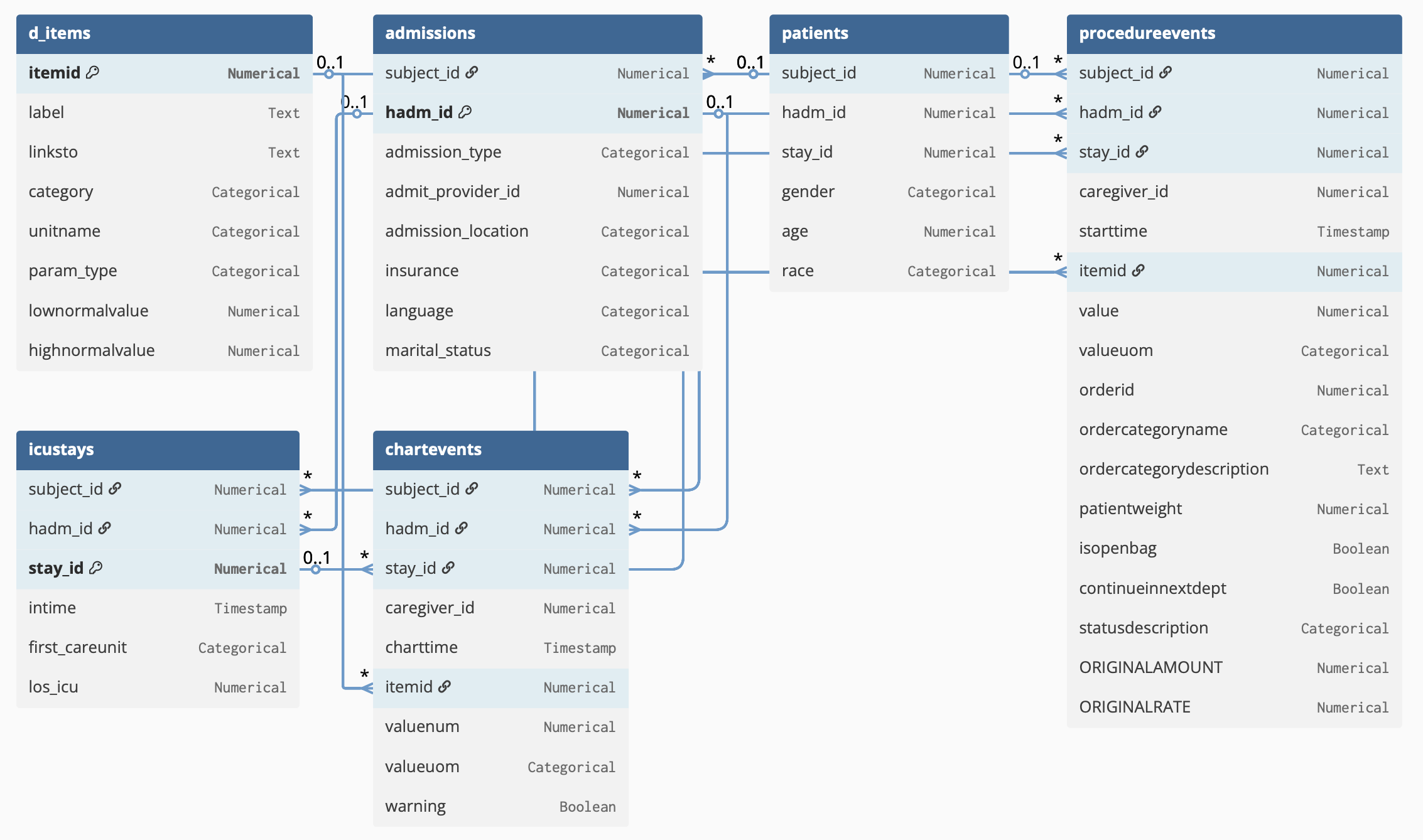
To load the pre-prepared, subsetted relational database in RelBench, do:
from relbench.datasets import get_dataset
dataset = get_dataset("rel-mimic")
References:
Dataset License: PhysioNet Credentialed Health Data License 1.5.0.
Usage Instructions
Gaining access to the dataset
MIMIC-IV is a credentialed dataset and is only available to approved users.
-
Request access to MIMIC-IV by following the instructions at the bottom of the official PhysioNet page:
-
Once approved, return to the same PhysioNet page and complete the step “Request access using Google BigQuery.” RelBench retrieves MIMIC-IV data through BigQuery rather than local file downloads.
Downloading the dataset in RelBench
After you have been granted BigQuery access, complete the following steps on the machine where your Python code will run.
-
Install the Google Cloud SDK by following the official instructions:
https://docs.cloud.google.com/sdk/docs/install-sdk - Create Application Default Credentials (ADC). Run the following command once in a terminal:
gcloud auth application-default loginThis step is required for Python client libraries such as google-cloud-bigquery. Running gcloud auth login alone is not sufficient.
- Set a billing or quota project. BigQuery requires a project with billing enabled to execute queries:
gcloud auth application-default set-quota-project YOUR_PROJECT_IDReplace YOUR_PROJECT_ID with a Google Cloud project that has billing enabled.
- Locate the ADC credentials file. After login, gcloud prints the path where credentials are stored, for example:
~/.config/gcloud/application_default_credentials.jsonThis is the file that Python must be able to access.
- If the ADC credentials file is not located at the default path, set the environment variable:
export GOOGLE_APPLICATION_CREDENTIALS="/path/to/application_default_credentials.json" - Save the project ID environment variable used by your code. For example:
export PROJECT_ID="your_project_id"
Customizing the dataset
While the pre-prepared RelBench MIMIC-IV uses only a subset of the full dataset, you can customize the dataset to meet your needs by loading the dataset directly and specifying parameters such as patients_limit, tables_limit, drop_columns_per_table, min_age, etc.
For example:
drop_columns_per_table = {
    "admissions": [...],
    "chartevents": [...],
    ...
}
tables_limit = ["patients", "admissions", "icustays", "chartevents", "procedureevents", "d_items"]


dataset = MimicDataset(
    patients_limit=20000,
    out_path='/data',
    cache_dir='/cache',
    tables_limit=tables_limit,
    db_params=db_params,
    drop_columns_per_table=drop_columns_per_table
)
db = dataset.make_db()
Entity Classification Tasks
patient-iculengthofstay
Task Description: For each patient admitted into the ICU, predict whether their stay will last at least 3 days.
Evaluation metric: AUROC